The sensible way to roll out MCP Servers across your team
23 Apr 2026
|
3 min read
If you've started playing with MCP servers, you'll know the pattern. One team wires up a GitHub MCP. Someone else bolts on a Jira one. The finance team is quietly experimenting with a third. Three months in, nobody knows who has access to what, where the logs live, or whether anything sensitive is leaking out the door.
That's the problem MCP portals solve.
What an MCP portal actually is
An MCP portal is a single front door to every MCP server your team uses - internal ones you've built, and third-party ones like GitHub, Linear, or Salesforce.
Instead of each person connecting their AI client to a dozen different servers, they connect to the portal. The portal then shows them every server they're authorised to use, and routes their requests through.
Think of it like a reverse proxy for your AI tooling. One connection point, one place to manage access, one place to see what's going on.
Instead of each person connecting their AI client to a dozen different servers, they connect to the portal. The portal then shows them every server they're authorised to use, and routes their requests through.
Think of it like a reverse proxy for your AI tooling. One connection point, one place to manage access, one place to see what's going on.
Why this matters at an organisation level
A few things stop being painful the moment you put a portal in front of your MCP servers:
- Access control in one place.
Finance sees finance tools. Engineering sees repos and deploy systems. You define it once, not per-employee per-server. - Audit logs that actually exist.
Every request through the portal is logged. When compliance asks "who accessed the customer database via AI last month", you have an answer. - DLP guardrails.
You can stop PII, credentials, or customer data from being shipped out to third-party MCP servers. Without a portal, that's on the honour system. - No more shadow MCP.
Staff aren't running random MCP servers on their laptops connected to production systems. It all goes through the portal or it doesn't go at all.
Why it's easy to maintain
- One config to change. New hire joins finance? Add them to the finance portal group. Done. You don't touch ten different MCP servers.
- Upgrade once.
- When a third-party MCP server changes its auth or endpoints, you fix it in the portal. Every user picks it up automatically.
- Code Mode reduces noise.
- Cloudflare's portal exposes tool schemas progressively rather than dumping everything up front — they're quoting a 94% reduction in token usage. Cheaper AI bills, faster responses.
- Supply chain risk drops.
- You're not relying on every employee running locally-hosted MCP servers from who-knows-where. The portal is the single vetted path.
What this looks like for an end user
Nothing changes, in a good way. You point your MCP client - Claude, Cursor, whatever you're using - at the portal URL. You log in once. Every tool you're allowed to use appears. You don't need to chase IT for API keys.
You don't need to know which server does what. If you've got permission, it's there.
You don't need to know which server does what. If you've got permission, it's there.
How to set one up
Cloudflare's version ships as part of their Zero Trust stack. Rough shape of the setup:
- Pick your identity provider. Most teams already have one - Google Workspace, Microsoft Entra, Okta. The portal hooks into this for SSO.
- Create the portal in Cloudflare Zero Trust.Under Access, define a new MCP portal and give it a hostname (something like mcp.yourcompany.com
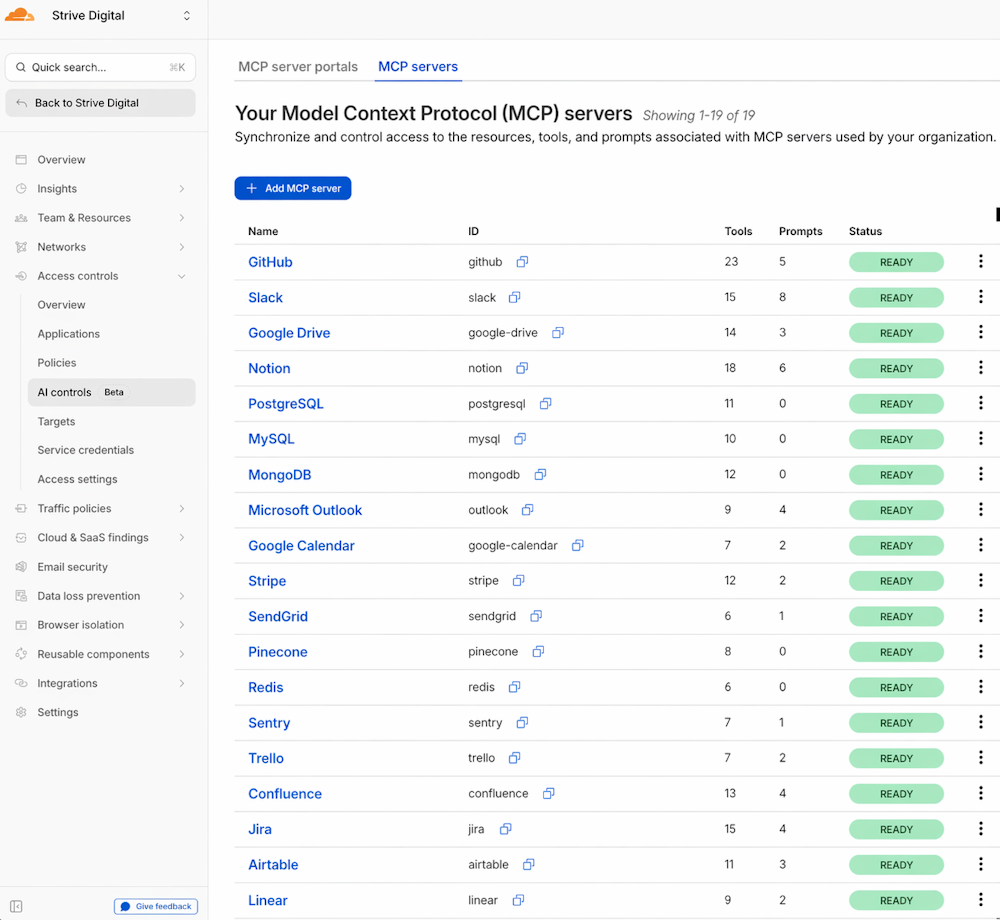
- Add your MCP servers.Point the portal at each MCP server - internal ones on your network (via Cloudflare Tunnel if they're behind a firewall), and third-party ones by URL.
- Define policies. Group your users - finance, engineering, support - and map each group to the servers and tools they should see. This is also where you enable DLP rules.
- Turn on logging.Enable request logging to your preferred destination - Cloudflare Logpush, an S3 bucket, or a SIEM.
- Hand out the portal URL. Staff point their MCP client at it, authenticate via SSO, and they're in.
Realistically, a small team can have this running in an afternoon. A larger one with existing IdP and tunnel setups should budget a day or two to get policies right.

The takeaway
MCP is going to be part of how work gets done. If your organisation is going to let staff use it - and you should - you want one door, one policy, one audit trail. Not a hundred laptops quietly talking to a hundred different servers.
A portal is the boring, sensible layer that makes the fun stuff safe to use.
If you want a hand standing one up, sing out.